Revolutionising your Buzzstream Database with URL Profiler
 Link Building
One of the benefits of being an SEO of the modern age is the access to software developed by people who know and understand the need of analysing websites. Prospecting is one the dreaded laborious tasks of SEO: crawling and scraping through Google for the right website takes time, with no guarantee that you will find the best blogs out there suited to your needs. It is made much more tolerable by software which has been created by experts who have endured scraping, and searching through Google for the right website and thought, “There must be a better way to do this”.
Buzzstream is that better way of doing things.
Having used Buzzstream for a few years now, I’ve seen it set-up right, and I’ve seen it set-up horribly. A database is only as good as the clean data that you put into it and coming from a sales background I know just how important a database can be to building up a pipeline.
For me, when it comes to prospecting there are only four fundamental things our researchers must find for the websites they are adding to their databases.
- The Domain
- An E-mail / Contact Form
- The Right Metrics
- The Niche
These four things will ensure that our database continues to be enriched with quality websites.
The combination of these four can be pretty crucial to finding the right sites for your campaign and Buzzstreams prospecting tool can pull in the first three pretty easily.
Google Operators
So as not to repeat what Buzzstream has detailed quite well on their own site you can read how their prospecting tool works here. I thought I would share some of my own tips around the prospecting tool and the sort of things we do to help keep our databases sparkling with new results.
The screenshot below highlights the prospecting profile with some of the Google Operators built up to pull in the most relevant results to help us find lists of “Android Blogs”. In this example we are searching for blogs that have written about Android Apps and are happy to blog about the “7 Top Android Apps”.
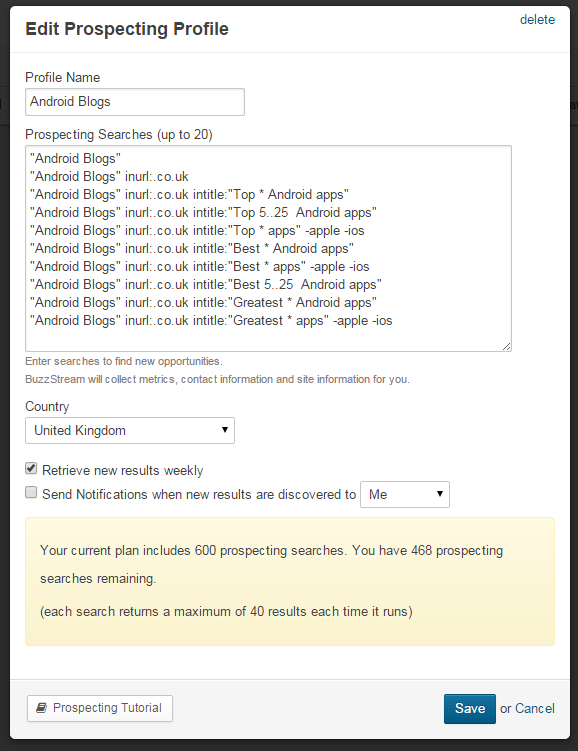
“Android Blogs”
A fairly basic one but the quotation marks (“like this“) either side of a word says to find that exact phrase.
inurl:.co.uk
Tells the prospecting tool to only pull back results that have “.co.uk” in the url. This can also be useful to find “contact-us”, “submit-post”, “pr-friendly” etc.
intitle:
This uses the “intitle:” operator to search for posts with the text you specify in between the <title></title> sections of the URL.
intitle:”Top * Android Apps”
The Asterix (*) in this represents a wildcard telling the tool to look for anything in between the phrase that we have specified. Ideally I would be looking for something like “Top 7 Android Apps” or “Top 25 Movie Android Apps”
intitle:”Best 5..25 Android apps”
By putting two full stops in between a number range your results will pull in all articles that have the title you want, but fill the whole numbers in the range. Perfect if you are looking for those results that couldn’t quite get to a round number.
-Negative Results
The main reason I used Apps and Mobile Phone blogs in this example is to show the effective use of negating popular results. With this particular niche flooded with Apple Fanboydom we can cut through the sea of posts about Apple or iOS by placing a minus sign (-) against the word.
URL Profiler + Buzzstream = Happy Database
Now that we have gone through and collected lots of relevant sites, we still have the process of discovering e-mail addresses, classifying their niche and making sure they hit the right metrics and this is where combining URL Profiler with Buzzstream can create a super strong hit list.
Introducing URL Profiler
For those who are not familiar with URL profiler, it is a scraper tool created by the guys and girls at Evolution Internet Marketing LLP. Utilising multiple API’s it can pull in everything from Majestic data to Copyscape checks. As a tool for analysing websites it relies on your knowledge of the market, but equips you with the tools to do some proper analysis on the lists of sites you throw at it.
All the collected data from the APIs get formatted into an XML file, which displays the information you requested allowing you to take the information you need and discard the rest.
In the screenshot below I am interested in Majestic Data on both domain and page, e-mail addresses found, Whois e-mails and the uClassify results.
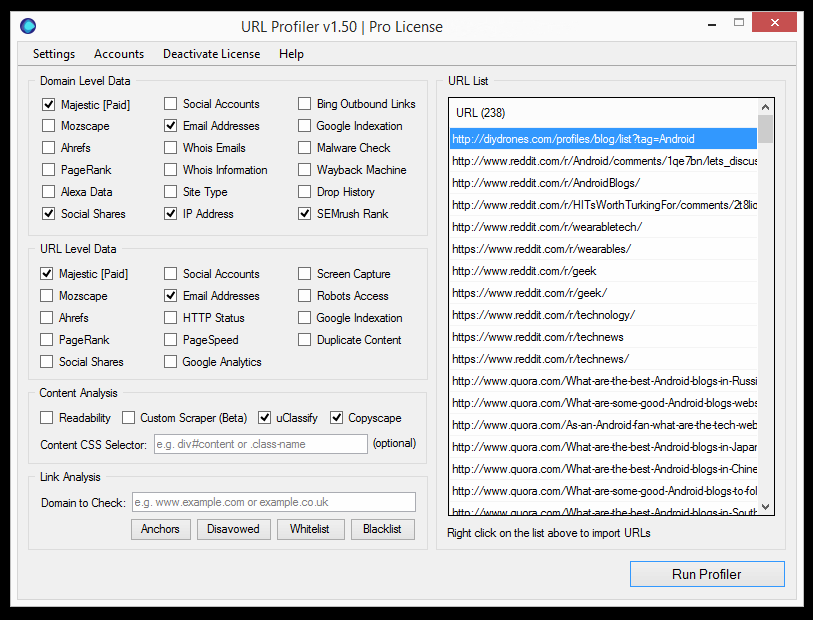
This will spit out all the information I need to add to the data already classified by Buzzstream. Through Buzzstream I have already got:
- PageRank
- Domain Authority
- Juice Passing Links
- Social Information
- Discovered E-mail Addresses
- Contact URLs
But to add to this I now have
- Majestic Information
- SEMrush Rank
- Ahrefs
- Further E-mail Addresses
- Whois E-mails
- And most important of all uClassify
I’ve created custom fields in our Buzzstream database for the ones we use, so all I need to do is re-import the findings back into Buzzstream to begin outreach.
What is so special about uClassify?
Well for a start Patrick from URL Profiler had this to say:
“uClassify has quickly become one of our most used features, our users love it! When used for link prospecting it allows you to pinpoint arguably the most important link metric - relevance.”
uClassify is a fantastic project developed and imagined by Jon Kågström. Based out of Stockholm, Sweden, Jon and his team have been working on ways to essentially classify text. Their API allows you to do much more than what we are using it for, but essentially it looks at ways of classifying things such as sentiment, tone, mood and even the age the text is meant for.
By utilising their topic api through URL Profiler, we have been able to classify all our website niches in Buzzstreams tag system without having the issues of ever changing niche names or having to continually update the system with sub categories.
As a result we have ended up with a fantastic database, that is well classified and full of quality websites we want our clients to work with.
So there you have it by utilising the Buzzstream prospecting tool and the power of information scraping from URL profiler you can create a strong database of contacts that will aid the first and most important stage of your outreach process.
If anybody has other uses for URL Profiler, I would love to hear them in your comments
-
http://linkarati.com Nicholas Chimonas
